
Automatic Triggers for Workflow Automation
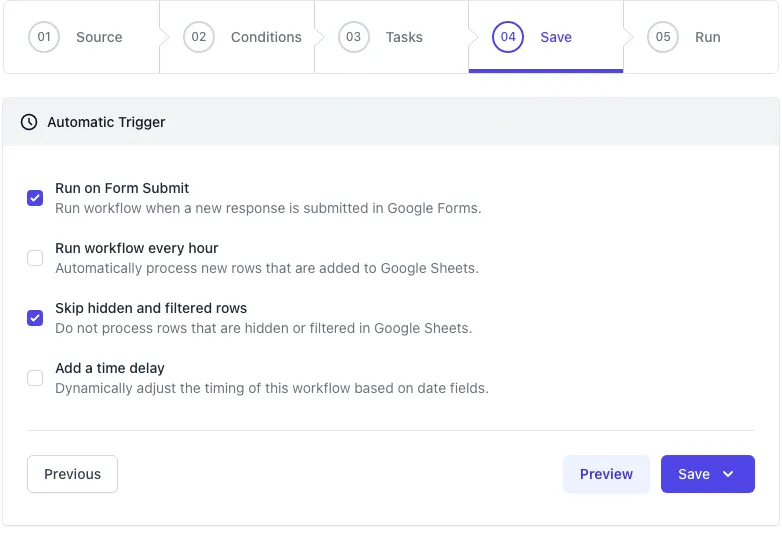
Automation workflows in Document Studio can be triggered in multiple ways.
Run on Form Submit
Section titled “Run on Form Submit”The most common way to trigger Google Form workflows is to run them automatically when a form is submitted. This option is only available when the source sheet is connected to a Google Form. Form triggers in Google Sheets do not work with third-party online form service providers like Forms Studio, Typeform, Jotform or SurveyMonkey.
Run workflows every hour
Section titled “Run workflows every hour”If you have an external source of data that is writing data to Google Sheets, you can create a trigger that runs the workflow every hour. This creates a background cron job that runs on the Google Cloud and it will work even if your Google Sheets app is not open.
When the hourly trigger is run, it will scan your Google Sheet and look for all unprocessed rows. It will then run the workflow for each row and mark them as processed by updating the Document Studio status columns in the spreadsheet.
Run workflows on specific schedule
Section titled “Run workflows on specific schedule”Workflows are triggered as soon as a new form is submitted or when an unprocessed row is found in the Google Sheet. However, you can check the Time Delay option to delay the workflow execution and run it later.
Run workflows manually
Section titled “Run workflows manually”If you have pending rows in your Google Sheet that you want to process, you can trigger the workflow manually. See our detailed guide on how to run a workflow manually.