
How to duplicate a mail merge campaign
Maya runs a workshop every month and emails an invite to each new group. The sender, the email template and other mail merge settings stay the same. Only the guest list and the date change. Instead of building the campaign from scratch, she can duplicate the existing Workshop Invites campaign and just change what’s new.
A campaign copy keeps everything from the original: the worksheet, sender name and email, CC, BCC and reply-to, the email template, and the tracking and unsubscribe settings. It gets its own name and its own open and click reports, so January’s numbers don’t mix with December’s.
Duplicating campaigns is available on the Starter and Pro plans.
Duplicate an email campaign
Section titled “Duplicate an email campaign”-
Go to Extensions > Mail Merge with Attachments > Open Mail Merge. Your saved campaigns for this spreadsheet are listed.
-
Click the ⋮ menu next to the campaign and choose Duplicate.
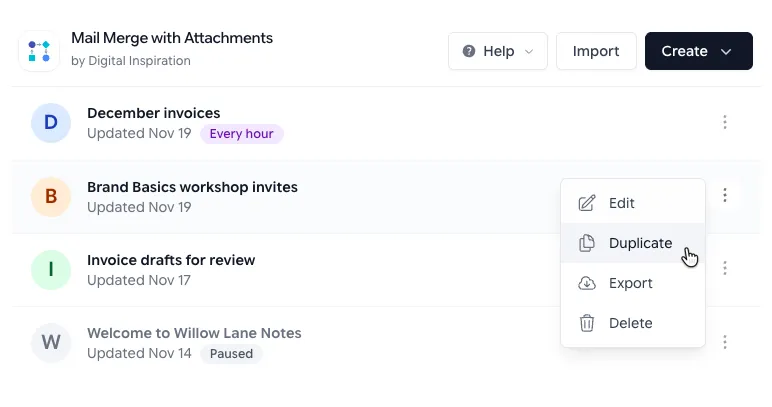
The ⋮ menu next to each campaign has Duplicate. -
The copy opens with (copy) added to its name, like Workshop invites (copy). Change the name to something you’ll recognize later, like Workshop invites - January.
-
Go through the steps and change what’s different this time. For Maya, that’s the worksheet with January’s guests and the workshop date in the subject and message.
-
On Save & Run, click Send Emails to send now, or uncheck Enable this campaign and click Save Campaign to send later.
The duplicate campaign is saved to your Google account only when you click Send Emails or Save Campaign. If you close the window before that, it’s gone, and the original is unchanged.
Things to know
Section titled “Things to know”- The copy reads the same Mail Merge Status column as the original. If you send it on the same worksheet, rows that say Email sent are skipped. Use a new tab, or clear the status column to send to everyone again.
- If the template is a Gmail draft, the copy uses that same draft. Editing the draft changes both campaigns, so to change the message for one of them, make a copy of the draft in Gmail and pick it on the Template step.
- To copy a campaign into a different spreadsheet, export it and import it there.