
How to Change the Layout of your Exported PDF Files - Email Spreadsheets
Email Spreadsheets supports multiple formats (Excel file, CSV, PDF and PNG) in which you can share your Google Spreadsheets as an attachment.
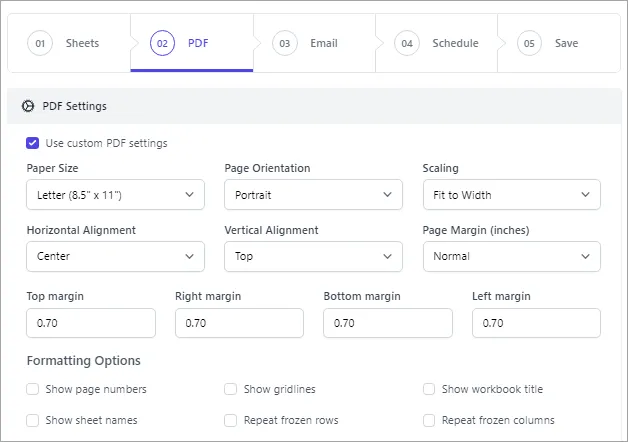
If you want to attach your Google Sheets as a PDF file, you have a variety of settings which you can customize according to your requirements.
| PDF Setting | Description |
|---|---|
| Paper Size | Size of each page of the file, like Letter (8.5”x11”), A4(8.27”x11.69”) etc |
| Page Orientation | Way in which page is orientated for viewing, i.e., Portrait or Landscape |
| Scaling | To enlarge, shrink or resize pages |
| Horizontal Alignment | Alignment of the sheet data (left, right or center) on the page |
| Vertical Alignment | Alignment of the sheet data (Top, middle or bottom) on the page |
| Page Margins | The blank spaces between your data and the edges of the page |
| Repeat frozen rows | Show row headers (if frozen in the sheet) on all pages of the file |
| Repeat frozen columns | Show column headers (if frozen in the sheet) on all pages of the file |